|
GreenBrowser is your best choice of a flexible and powerful green web browser.
..........................................................................................................................................................................................
|

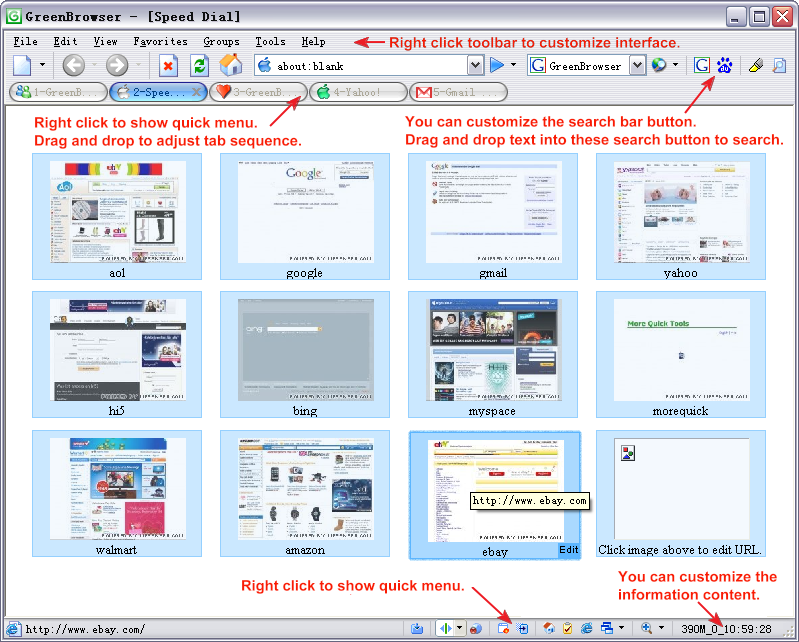
 AD Filter, Mouse Gesture, Mouse Drag, Auto Fill Form, Auto Scroll, Auto Refresh, Auto Save, Auto Hide, Search Bar, Identity, General Form, Auto Submit Form, Send Key to Page, External Toolbar, Collector, Page Manager, Download Manager, Group, Plugin, Skin, Proxy, Start Mode, URL Alias, Quick Key, Link List, Status Bar Setting, Sort Save Page, Clean System, Page Download Control, Page Zoom, Page Background Color, Speed Dial, Top Video Player...
 Search Engine
 Auto Fill Form
 Mouse Drag
 Mouse Gesture
 Ad Filter
 Collector
 Groups
 Plugin
 Tab Bar
 Status Bar
 Boss Key
 Shortcut Key
 Page Manager
 Save Page
 Link List
 Quick Menu
 Speed Dial
 Top Video Player
User Appraise |
|
After use more than 10 browser, I feel GreenBrowser is the fastest browser, the best browser! This is an outstanding web browser. It's a
lot like Maxthon and Slim Browser in many ways. For example, it
offers tabbed browsing, plenty of security features (ad blocking,
site blocking, and so on) as well as a ton of configuration options.
I've found, though, that GreenBrowser is actually a bit faster than
either Maxthon or Slim Browser or -- for that matter -- just about
any other tabbed browser I've tried. So, the coding in GreenBrowser
must be very tight, I would think (which is nice!). If you're looking
for a tabbed browser, GreenBrowser is something you should try. During the last years, I spent 6 hours a day
navigating in the net so I had the opportunity to prove many browsers
(I would say almost all of them, except GreenBrowser of course)
Some of them better than the others. But GreenBrowser is just the
best of all. Really excellent! Very very well thought! It could
fit all I wanted from a browser. You have forgotten practically
nothing and this is much to say. Very recommendable! Congratulations! I am now using Greenbrowser, a very versatile
and fast browser, giving users so many and very useful features,
and in my experience the most easy to use so far among browsers
I have experimented with; and it is packed into less than one meg
of bytes -- plus it is free and not cluttered with ads. I have tried many browser based on Microsoft rendering engine, such as Crazy browser and Maxthon. But Green browser is The fastest one, it allocating The less of RAM, and i can use it with my screen reader. Never have I used a more configurable web browser! Other browser suppliers think people are too stupid to set up their browser the way they want---not so with Green Browser---it is GREAT! After researching and testing about every browser there is, i have come to the conclusion that greenbrowser is the best browser that exists. It is not only lightweight and extremely fast, but greenbrowser also does not hog all of your computer's memory or RAM. Also, with a small size of less than 3 megabytes, it can be installed on most computers without affecting their performance. Also, greenbrowser is bursting with options, and it also contains more features than chrome or firefox. Greenbrowser is sooo awsome!! For more user options, please search in the download website and forum |
Skill |
|
Have you felt that it's not convenient to use IE? That's OK! GreenBrowser can help you, it's easy and powerful... Skill 1: use F4 to quickly close the window Skill 2: drag a link to open it in a new window Skill 3: drag an image to save it to the collector Skill 4: use Mouse Drag to view a huge page or image Skill 5: use Mouse Gesture to help you to quick view the page Skill 6: use drag pop menu to quick search text and open link Skill 7: you can add search engine to the search bar Skill 8: drag image to quickly show image or view image url Skill 9: set special download control for group url |
Help |
| English, Chinese, German, French, Japanese, Russian, Ukrainian, Dutch, Spanish, Portuguese, Hungarian, Korean |
Translate/Skin |
1.Translate Original GreenBrowser language file is English.ini under language catalogue of all language edition. |
Award |




|
Links |

|